

Resume headers are the single most common reason a perfectly qualified candidate disappears from an ATS before a recruiter ever sees their name. Headers in resumes are sections placed in the top margin of a document, typically holding contact details like your name, phone number, and email. The problem is that most Applicant Tracking Systems, the software formally known as ATS parsers, treat those margin regions as outside the readable document body. When your contact information lives there, the system either skips it entirely or produces a partial parse that leaves your application looking incomplete. Understanding why headers confuse resume parsers is the first step toward fixing a formatting problem that costs candidates real interviews.
Why headers confuse resume parsers: the technical breakdown
ATS software processes your resume in three stages: document conversion, section segmentation, and field extraction. Each stage depends on the parser reading content in a predictable, linear order. Headers and footers break that order because they exist in structured margin regions that most parsers are programmed to skip or deprioritize.
Greenhouse, one of the most widely used ATS platforms in enterprise hiring, documents this directly: resumes with contact information stored in a header, footer, or text box frequently produce partial parses. That means the system may capture your work history but miss your name or phone number entirely. A partial parse does not trigger an error message for you. The recruiter simply sees an incomplete candidate record.

The core issue is structural. Parsers are designed to read the main document body as a continuous text stream. Headers and footers are rendered as separate, floating regions in file formats like .docx and PDF. Many parsers either ignore those regions by design or attempt to read them with a different extraction logic that frequently fails.
Multi-column layouts compound the problem. When a header contains columns or graphical elements, the parser may concatenate text from different columns into a single garbled string. Your name, city, and LinkedIn URL can end up merged into one unreadable field.
- Header/footer regions: Treated as non-body content by most parsers, often skipped entirely
- Text boxes inside headers: Rendered as floating objects, invisible to linear text extraction
- Graphic elements or logos: Converted to image data the parser cannot read as text
- Page numbers in footers: Sometimes misread as dates or irrelevant numeric data by the parser
Pro Tip: Open your resume in a plain text editor like Notepad. If your contact details do not appear at the top of the raw text output, they are almost certainly in a header region the ATS cannot read.
Headers vs. body placement: what actually gets parsed?
The clearest way to understand the impact of headers on parsing is to compare two identical resumes with one difference: where the contact information lives.
Resume A stores the candidate's name, email, phone, and LinkedIn URL in a Word document header. The body of the resume begins with a Summary section. When this file goes through an ATS like Greenhouse or Workday, the parser starts reading at the body. The candidate's contact details are either skipped or captured incompletely. The recruiter may see a candidate record with a work history but no email address.
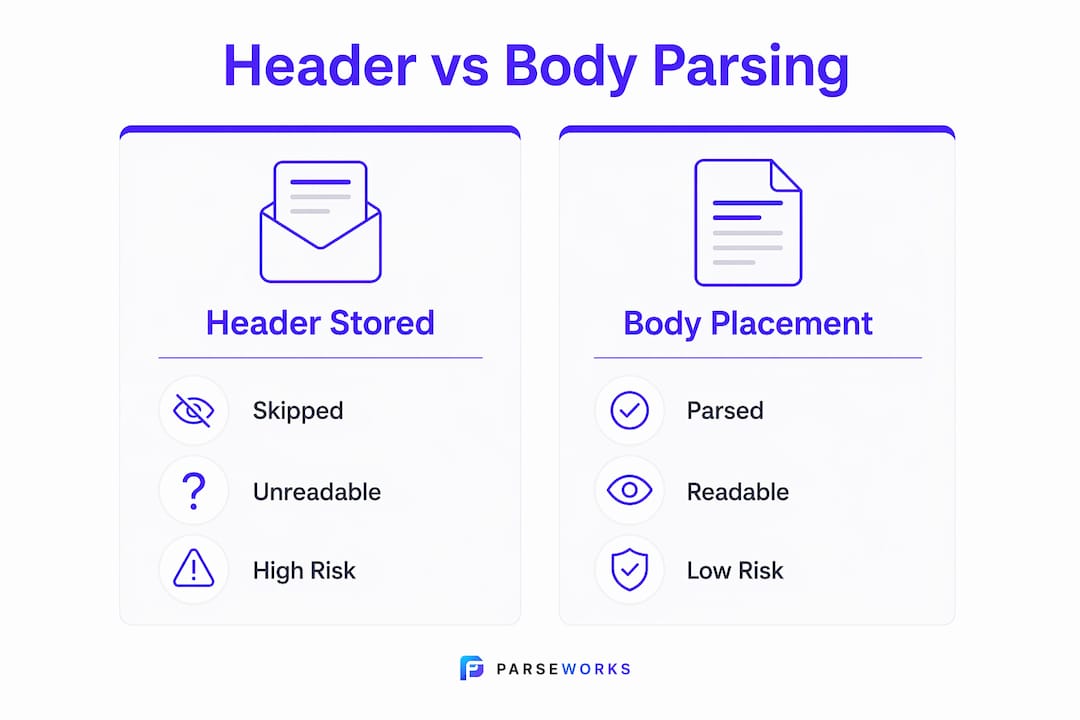
Resume B places the same contact details at the very top of the document body, formatted as plain text. No header region is used at all. The parser reads the name, email, and phone number first, in order, and populates the candidate record correctly. The recruiter sees a complete profile.
Placing contact info in the main body is the single most effective formatting change you can make for ATS readability. It costs nothing visually and eliminates the most common source of parsing failure.
| Resume Format | Contact Info Location | Parse Outcome | Risk Level |
|---|---|---|---|
| Header-stored contact info | Document header region | Partial or skipped parse | High |
| Body-stored contact info | Top of main document body | Full, accurate parse | Low |
| Text box in header | Floating object in header | Invisible to parser | Very High |
| Multi-column header layout | Header with columns | Scrambled or merged fields | High |
| Plain text body, no header | Main body, linear format | Consistent full parse | Low |
Pro Tip: After submitting an application, ask the recruiter or check the portal to confirm your candidate record shows your name, email, and phone correctly. A successful upload confirmation does not mean all fields parsed accurately.
ATS parsing performance varies by system, so a format that works in one portal may fail in another. Never assume a clean upload equals a clean parse.
What resume formatting mistakes trigger parser failures?
Most resume formatting problems that cause parser issues come down to one misunderstanding: candidates treat their resume as a designed document rather than a structured data file. ATS parsers do not care how your resume looks. They care whether they can extract your data cleanly.
Headers and footers cause invisible text errors that are among the most damaging formatting mistakes in 2026. The word "invisible" is precise here. The text exists in your file, but the parser never processes it. You do not get a warning. Your application simply goes in with missing data.
Here are the specific header-related mistakes that most frequently break ATS parsing:
- Storing your name in a document header: This is the highest-risk placement. If the parser skips the header, the recruiter sees a nameless candidate record.
- Using tables inside headers: Tables create a grid structure the parser reads as separate cells, often out of order, producing scrambled output.
- Adding a headshot or logo to the header: Image data is unreadable to text parsers. It also adds file weight that can cause upload failures.
- Putting your LinkedIn URL or portfolio link in the footer: Footer regions carry the same parsing risk as headers. Links placed there are frequently lost.
- Using decorative lines or borders in the header area: These are rendered as graphic objects, not text, and can interrupt the parser's reading flow.
- Relying on color-coded or shaded header backgrounds: Color formatting does not survive document conversion in most ATS systems and can corrupt adjacent text fields.
The confusing resume structures that cause the most damage are not always the most visually complex. A simple Word document with a two-line header containing your name and phone number can still produce a partial parse if those lines are in the document's header region rather than the body.
Check your Word document by going to Insert > Header. If your contact details appear there, move them into the body immediately.
How to format your resume for clean ATS parsing
Fixing header-related resume parser issues does not require a complete redesign. It requires moving the right content to the right place and stripping out the formatting structures that break parsers.
Follow these steps to produce an ATS-friendly resume format that passes cleanly through systems like Greenhouse, Workday, Taleo, and iCIMS:
- Move all contact details into the document body. Place your name, phone, email, LinkedIn URL, and city at the very top of the body text. Format them as plain text, not a table or text box.
- Delete the document header and footer entirely. In Microsoft Word, go to Insert > Header > Remove Header. Do the same for the footer. This eliminates the risk of any content being stored in those regions accidentally.
- Use a single-column, linear layout throughout. Parsers read top to bottom, left to right. Any column structure, including those that look simple, can cause fields to merge or swap positions.
- Save as .docx unless the job posting specifies otherwise. The .docx format gives most ATS parsers the cleanest read. Simple, text-based PDFs are generally acceptable, but PDFs created from scanned images are not parseable at all.
- Verify your parsed record after submission. Even successful uploads with headers may produce incomplete candidate records. Where the portal allows it, review your profile to confirm your name, email, and phone populated correctly.
- Use standard section labels. Headings like "Work Experience," "Education," and "Skills" are recognized by virtually every parser. Creative labels like "My Story" or "Where I've Been" are not.
For a deeper look at how specific formatting choices affect your ATS score, the resume formatting ATS guide from Parseworks covers the full range of 2026 compatibility standards.
Pro Tip: Run your resume through a plain text conversion before submitting. Copy all body text into Notepad or a similar plain text editor. If the output reads logically from top to bottom with no scrambled lines, your formatting is likely parser-safe.
Key takeaways
Resume headers cause ATS parsing failures because parsers treat margin regions as non-body content, which means contact details stored there are frequently skipped, scrambled, or lost before a recruiter ever sees your application.
| Point | Details |
|---|---|
| Headers are a structural risk | Document header regions are skipped or misread by most ATS parsers, not just stylistically problematic. |
| Contact info belongs in the body | Place your name, email, and phone at the top of the document body to guarantee parser capture. |
| Partial parses are silent failures | A successful upload confirmation does not mean your data parsed correctly. Always verify your candidate record. |
| File format matters | Save as .docx for the most reliable ATS parsing across platforms like Greenhouse and Workday. |
| Plain text is the safest test | Pasting your resume into Notepad reveals exactly what a parser will read and what it will miss. |
The header problem is bigger than most candidates realize
I have reviewed hundreds of resumes from qualified candidates who could not figure out why they were not getting callbacks. In a significant number of those cases, the answer was not their experience or their keywords. It was their contact information sitting in a Word document header, invisible to the ATS.
The frustrating part is that this is not a new problem. Greenhouse has documented it publicly for years. Yet resume templates sold on Etsy, Canva, and similar platforms still default to header-stored contact information because it looks clean and professional. Those templates are designed for human eyes, not parsing engines.
The misconception I hear most often is that a "successful upload" means everything worked. It does not. A successful upload means the file transferred. What the parser did with that file is a separate question entirely. I have seen candidate records in ATS portals where the name field is blank and the phone field contains a garbled string of text that was clearly pulled from the wrong part of the document.
My honest advice: treat your resume as a data file first and a designed document second. The recruiter who eventually reads it will appreciate clean formatting. The ATS that processes it first only cares about extractable text. You need to satisfy both, and the ATS comes first in the sequence. Verifying your parsed candidate record after every application is not paranoia. It is the only way to know your information actually landed.
— Sam
Check your resume for header issues before your next application
If you are not sure whether your resume has header-related formatting problems, Parseworks gives you a fast answer.
The free ATS resume checker from Parseworks scans your resume for the exact issues covered in this article: header and footer content, text boxes, multi-column layouts, and non-standard section labels. You get an instant readiness score along with specific fixes, not a generic report. Upload your resume once and see exactly what an ATS parser will read, what it will miss, and what you need to change before your next application goes out.
FAQ
What exactly does an ATS do with resume headers?
Most ATS parsers treat document header regions as non-body content and either skip them entirely or attempt to read them with a separate extraction process that frequently fails. Greenhouse documents this behavior as a known cause of partial or unsuccessful resume parses.
Does saving as PDF instead of .docx fix header parsing problems?
No. A PDF created from a Word document with a header still contains that header region, and many ATS parsers handle PDFs less reliably than .docx files. The fix is removing the header content entirely, regardless of file format.
How do i know if my resume parsed correctly after i submitted it?
Where the application portal allows it, log in and review your candidate profile to confirm your name, email, and phone number appear correctly. Even a clean upload can produce an incomplete record if your contact details were stored in a header or footer.
Can i still use a visually distinct name section at the top of my resume?
Yes. Place your name and contact details at the very top of the document body as plain text. You can make your name larger or bold without using the document's header region. The key is keeping everything inside the main body text flow, not in the margin area.
Do all ATS systems have the same header parsing limitations?
No. Parsing performance varies by platform, and some newer systems handle headers better than others. However, ATS parsing accuracy across systems is inconsistent enough that placing contact information in the body remains the safest practice for every application you submit.